
Issue an e-Fatura, e-Arşiv or e-SMM from an invoice, send it to the customer, and follow its status.
You create an e-document by hand, one invoice at a time. Veterian never issues one on its own. You need permission to edit invoices.
Check every line first: tax rate, quantity and price. An issued e-document can’t be changed or cancelled in Veterian.
Create It
Section titled “Create It”-
Open the invoice from Invoices.
-
Click Create E-Document at the top of the page.

-
In the E-Document panel that opens, choose one of the options. Veterian sends the request as soon as you click. There is no confirmation step.
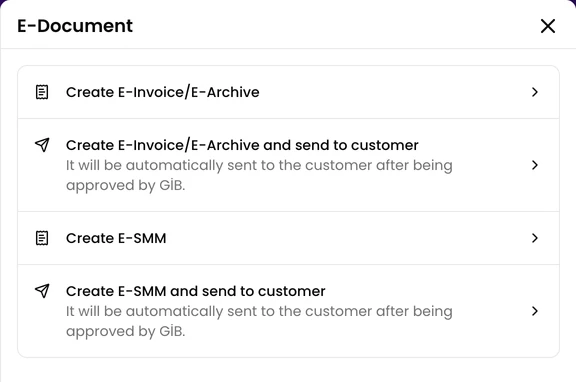
- Create E-Invoice/E-Archive
- Create E-Invoice/E-Archive and send to customer
- Create E-SMM
- Create E-SMM and send to customer
The page shows only the document types the invoice’s lines need. See Which Document an Invoice Gets.
When the Button Doesn’t Appear
Section titled “When the Button Doesn’t Appear”Create E-Document isn’t shown when:
- any line has a 0% tax rate. You cannot create E-Documents for products/services with a 0% tax rate.
- the invoice is dated more than 7 days ago.
- e-documents aren’t available for your clinic. Ask your clinic administrator.
Veterian also refuses an invoice dated earlier than your last issued document of the same type.
While It Is Processing
Section titled “While It Is Processing”The invoice shows Processing, and the invoice list shows Waiting for E-Invoice approval. or Waiting for E-SMM approval. GİB can take a few minutes, and the status updates on its own.
-
When the document is issued, the invoice shows a Download button for it.
-
If the document stays unconfirmed, Veterian marks it as failed and Create E-Document appears again.
Sending It to the Customer
Section titled “Sending It to the Customer”With an option that ends in “send to customer”, Veterian sends the customer a link to the document. It goes through the channels you turned on for Invoice E-Document Created in Clinic Settings → Message Templates, and only on channels the customer accepts.
The invoice then shows Sent to Customer and, once the customer opens it, Downloaded by Customer.
Invoices With Two Documents
Section titled “Invoices With Two Documents”An invoice with both veterinary service and commercial lines needs two documents: an e-SMM and an e-Fatura or e-Arşiv. You create them one at a time, with two clicks.
Changing or Cancelling
Section titled “Changing or Cancelling”- An invoice with an issued e-document is locked and can’t be edited or deleted.
- If creating a document fails, a clinic administrator can use Revert to draft, fix the invoice and try again.
- Veterian can’t cancel an e-document. Ask your accountant how to cancel it with your provider. When the provider reports it as cancelled, Veterian unlocks the invoice.