
Give a customer a discount on an invoice, and change or remove it before you save the invoice.
A discount is an amount you take off a whole invoice. Veterian shares it out across the invoice lines.
Where to Find This Section
Section titled “Where to Find This Section”On the invoice page, under the lines, next to the totals. See Create an Invoice to start an invoice.
Add a Discount
Section titled “Add a Discount”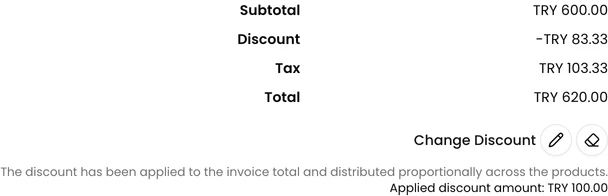
- Add the products and services first.
- Click the plus button next to Add Discount.
- Choose Apply discount to subtotal or Apply discount to invoice total.
- Enter the discount as an amount, not a percentage.
- Press Enter or click the check button.
With Apply discount to subtotal, the discount comes off the Subtotal, before tax. The totals show The discount has been distributed proportionally across the products.
With Apply discount to invoice total, the amount you enter comes off the invoice Total. The totals show The discount has been applied to the invoice total and distributed proportionally across the products. The amount you entered is shown below it as Applied discount amount.
Each line then has a Discount column with its share of the discount, as an amount and a percentage.
Change or Remove a Discount
Section titled “Change or Remove a Discount”Next to Change Discount:
- The pencil button lets you enter a new amount.
- The eraser button removes the discount.