
Print your clinic's visit register for any period as a PDF, or download it as a CSV file.
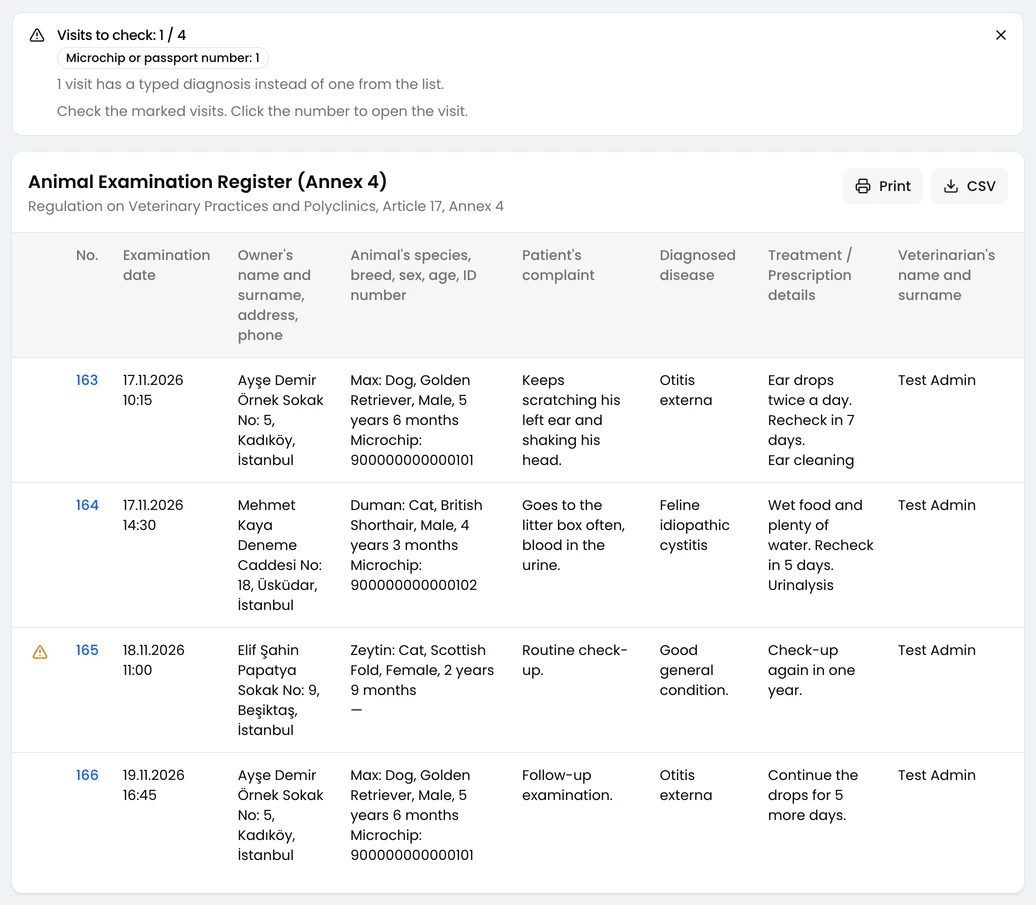
The Visit Register lists every visit of a period, one row each. For clinics in Turkey it has the eight columns of the official register (Hayvan Muayene Kayıt Defteri, Ek-4).
Where to Start
Section titled “Where to Start”Open Reports in the left menu. Under Visit Reports, click Visit Register.
Your role needs the View Visit Reports permission. Role permissions are covered in Roles.
Print the Register
Section titled “Print the Register”-
Choose a Period, or click Select Date Range and pick the first and last day.
-
To see one vet’s visits, choose them under Veterinarian.
-
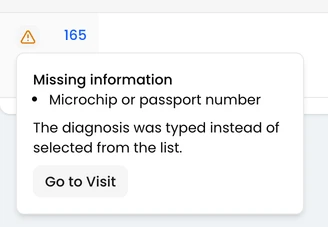
Check the warnings card above the table. It counts the visits with missing details. Click the warning icon on a row to see what that visit is missing, then click Go to Visit to fill it in.
-
Click Print. The PDF opens in a preview.
-
Choose the Language and the Orientation. It starts as Landscape; you can switch to Portrait.

-
In the preview, click Print or Download.
To get the same register as a spreadsheet, click CSV instead.
Numbering
Section titled “Numbering”The first visit of each year is number 1, and the count runs to the end of the year. A register for February continues from January’s numbers. Filtering by vet doesn’t change a visit’s number.
Before You Print
Section titled “Before You Print”- The responsible vet is printed under the signature line. A clinic admin chooses them with Responsible veterinarian on the user’s page.
- In Turkey the clinic’s address must be filled in, because it is printed on the register.
- Close on the warnings card hides the card and the row icons until you reload the page. The PDF and CSV never show them.