
See the week's vaccinations for all pets, find the overdue ones and administer them from one list.
Vaccine Calendar in the left menu lists the vaccinations of all your patients for one week. It opens on the current week.
Week, Search and Filters
Section titled “Week, Search and Filters”
- The arrows next to the dates move one week back or forward. This Week brings you back to the current week.
- Search pet or customer finds a pet or customer in the week’s list.
- Status and Vaccine narrow the list. If your clinic uses tags, you can also filter by Tag.
- The View menu groups the list By status or By vaccine, or shows it as one List.
The counts under the filters show the week’s Total, Today, Administered, Scheduled and Overdue vaccinations. Filter on a count shows only those vaccinations.
The List
Section titled “The List”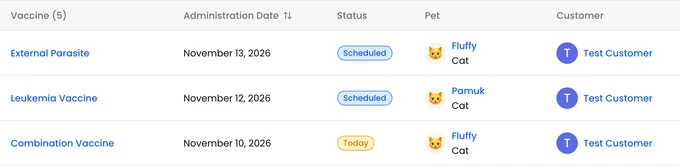
Each row shows the vaccine, the date, the status, the pet and the customer.
- Click the vaccine’s name to open the vaccination’s details. An overdue vaccination’s details have Send overdue vaccination notification. When you confirm, the customer gets a notification.
- Administer records the vaccination as given. The steps are the same as on the pet’s page. See Administer a Planned Vaccination.
- An overdue vaccination has a Change date button next to its date. Pick the new date and confirm.
To add a vaccination, start from the pet’s page. See Record a Vaccination.